Instructions and Downloads
റിപ്പോർട്ടിംഗ് സമയം: രാവിലെ 9:30 മുതൽ ഉച്ചയ്ക്ക് 1:00 വരെ.
Reporting Time: 9:30 AM to 1:00 PM
📋 Admission Instructions
Step 1: Portal Login
After the allotment from the University, every applicant is expected to login to the admission portal of Sri C. Achutha Menon Government College: www.admission.gcthrissur.com and complete the profile. Applicants can login to the admission portal of the college using the CAP ID provided by the university. Complete the profile and save it.
If you find difficulty in accessing the portal, kindly contact +91 8281417688.
യൂണിവേഴ്സിറ്റിയിൽ നിന്ന് അലോട്മെന്റ് ലഭിച്ച ശേഷം, എല്ലാ അപേക്ഷകരും ശ്രീ സി അച്യുത മേനോൻ ഗവൺമെന്റ് കോളേജിന്റെ അഡ്മിഷൻ പോർട്ടലിൽ: www.admission.gcthrissur.com ലോഗിൻ ചെയ്യുകയും പ്രൊഫൈൽ പൂർത്തിയാക്കുകയും ചെയ്യണം. യൂണിവേഴ്സിറ്റി നൽകിയ CAP ID ഉപയോഗിച്ച് കോളേജിന്റെ അഡ്മിഷൻ പോർട്ടലിൽ ലോഗിൻ ചെയ്യാം. പ്രൊഫൈൽ പൂർത്തിയാക്കി സേവ് ചെയ്യുക.
പോർട്ടൽ ആക്സസ് ചെയ്യുന്നതിൽ ബുദ്ധിമുട്ട് അനുഭവപ്പെടുകയാണെങ്കിൽ, ദയവായി +91 8281417688 എന്ന നമ്പറിൽ ബന്ധപ്പെടുക.
🎥 Admission Process Video Tutorial
അഡ്മിഷൻ പ്രക്രിയയുടെ പൂർണ്ണമായ ഗൈഡിനായി ഈ വീഡിയോ കാണുക
Step 2: Download Required Documents
Download the documents required from both the university portal (Admit card, Application form-college copy, mandatory fee receipt) and college portal (Index card). Fill and sign the required sections.
യൂണിവേഴ്സിറ്റി പോർട്ടലിൽ നിന്നും (അഡ്മിറ്റ് കാർഡ്, അപേക്ഷാ ഫോം-കോളേജ് കോപ്പി, നിർബന്ധിത ഫീസ് രസീത്) കോളേജ് പോർട്ടലിൽ നിന്നും (ഇൻഡക്സ് കാർഡ്) ഡൗൺലോഡ് ചെയ്യുക. ആവശ്യമായ ഭാഗങ്ങൾ പൂരിപ്പിച്ച് ഒപ്പിടുക
Step 3: Report to Department
Report to the department on the proposed date.
നിർദ്ദിഷ്ട തീയതിയിൽ ഡിപ്പാർട്ട്മെന്റിൽ റിപ്പോർട്ട് ചെയ്യുക.
Step 4: Track Admission Status
Track the progress of the admission in the admission portal and ensure that admission status is "Admitted" before leaving the college.
അഡ്മിഷൻ പോർട്ടലിൽ അഡ്മിഷന്റെ പുരോഗതി ട്രാക്ക് ചെയ്യുകയും കോളേജിൽ നിന്ന് പോകുന്നതിന് മുമ്പ് അഡ്മിഷൻ സ്റ്റാറ്റസ് "Admitted" ആണെന്ന് ഉറപ്പാക്കുകയും ചെയ്യുക.
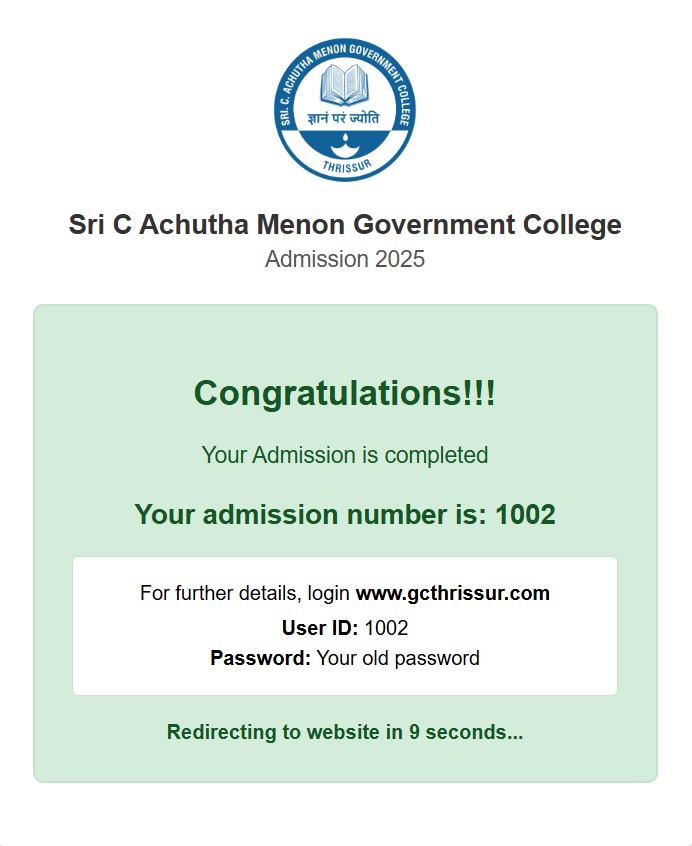
Example of Admission Status Display
📋 DOCUMENTS REQUIRED FOR ADMISSION TO FYUG or PG PROGRAMMES 2026
- Duly filled Index Card
- Admit Card from the University Admission Portal
- Mandatory Fee Receipt
- The Print out of the Application (College Copy)
- SSLC / Matriculation (Original and 2 copies)
- Higher Secondary Certificate (Original and 2 copies)
- Degree Certificate and Marks Card (Original and 2 copies) - Only for PG Admission
- Transfer Certificate (Original)
- Conduct Certificate (Original – Valid for 6 months from the date of issue)
- Community Certificate, Income Certificate and Non Creamy layer Certificate for OBC Category Candidates (Original and 2 copies) - Only if applicable
- Community Certificate along with Income and Assets Certificate for EWS in Annexure VII and VIII (Original and 2 copies) - Only if applicable
- Passport Size Colour Photo (3 copies)
- Copy of Aadhar Card
Important: Please read the complete admission prospectus carefully before filling out the application form. All information provided should be accurate and verifiable. Original documents must be brought for verification during admission.💰 Fee Structure
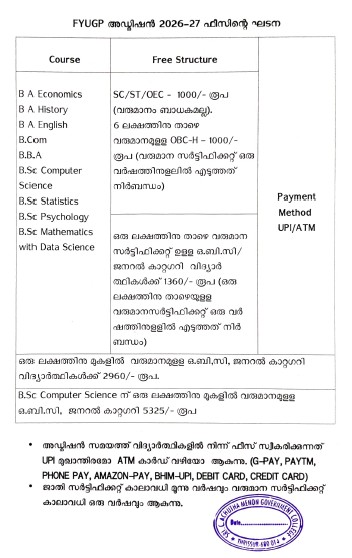
Admission Fee Structure for All Courses(UG)
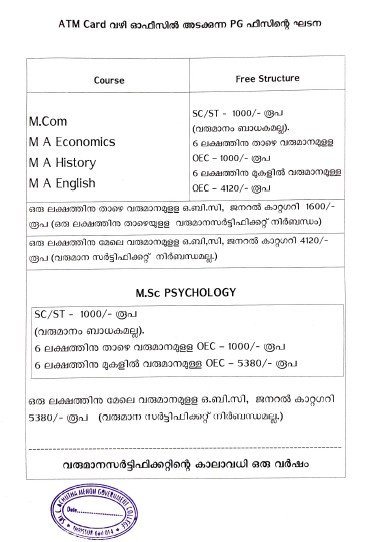
Admission Fee Structure for All Courses(PG)
Additional Fees
PTA Fees:
SC/ST (UG): Rs. 800/-
Others (UG): Rs. 4,650/-
SC/ST (PG): Rs. 750/-
Others (PG): Rs. 5,100/-Store Fees:
All students: Rs. 50/-പ്രത്യേകം ശ്രദ്ധിക്കുക:
ഫീസുകൾ പണമായി സ്വീകരിക്കുന്നതല്ല. UPI ആപ്പുകൾ മാത്രം ഉപയോഗിക്കേണ്ടതാണ്.Important Notice:
Cash payments are not accepted. Please use UPI apps for fee payment.← Back to Admission Portal📞 Contact Information
- Admission Nodal Officer: Dr. Razeena PR: +91 9447814200
- Office Hours(Admission): Monday to Friday, 9:00 AM to 4:00 PM
- Address: Sri C Achutha Menon Government College, Thrissur, Kerala